Plan Set Sizes Explained: ARCH vs. ANSI and Printing to Scale
Know your sheet sizes, avoid the “D-size” mix-up, and understand what happens to drawing scale when you print a reduced plan set.
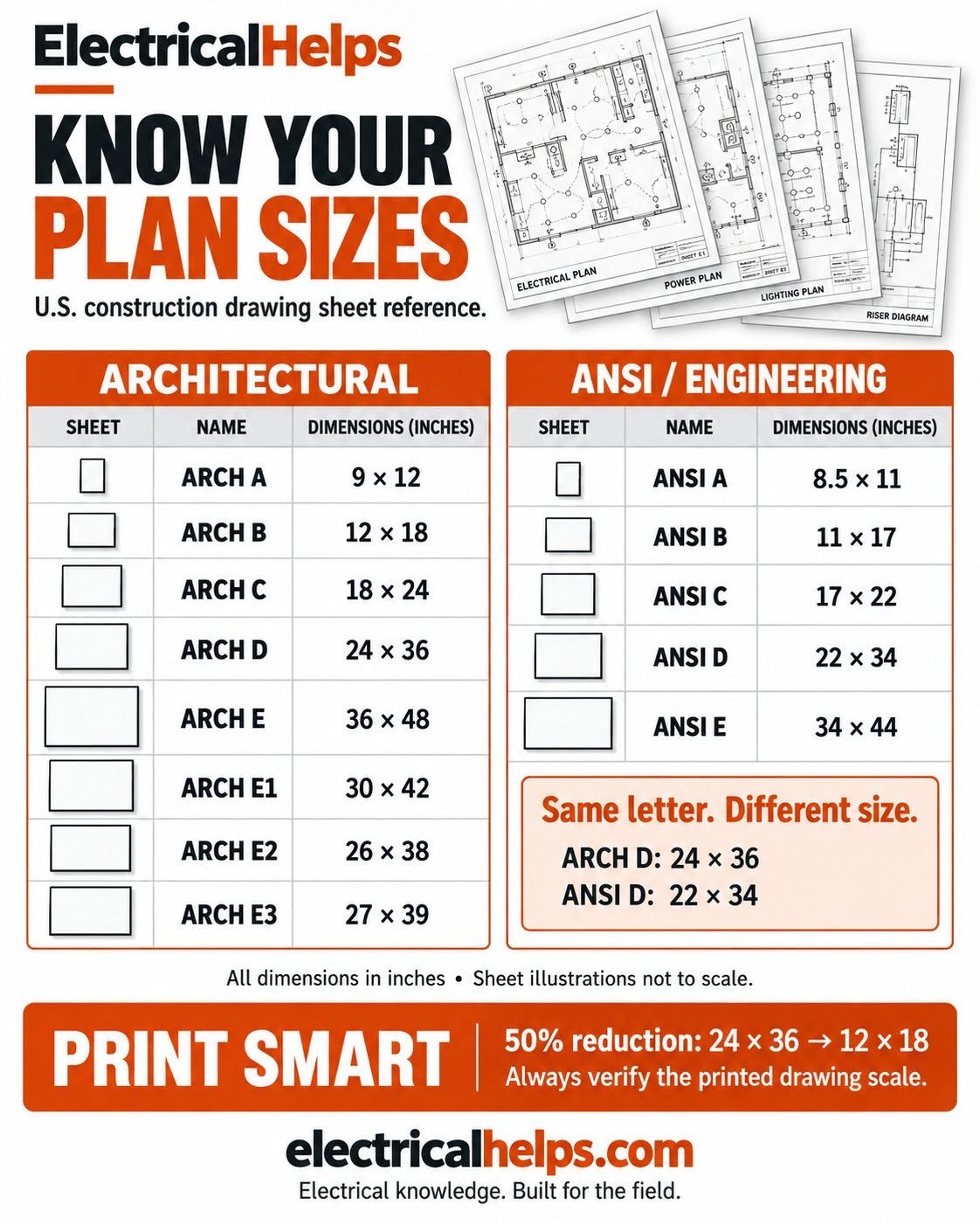
Sheet size and drawing subject are different things
Someone asks for a “D-size” set of electrical plans. Before you send it to the printer, there is one more question to ask: ARCH D or ANSI D? Both use the letter D, but they are different physical sizes. Picking the wrong one can change the print scale, crop the border, or make notes harder to read.
Our recent social post introduced the two size families. This guide takes the next step: how to identify your set, choose a print size, and check the result before using it for a takeoff or plan review.
Architectural drawings describe building layouts, spaces, dimensions, and finishes. Engineering drawings address technical systems such as structural, mechanical, plumbing, and electrical work. Those disciplines do not dictate the paper family. An electrical drawing can be issued on an ARCH sheet, and the letters in a drawing number are not a paper-size instruction. Check the project requirements and the actual PDF page dimensions.
ARCH vs. ANSI: the common U.S. sheet sizes
Use the full name and dimensions when ordering prints. “ARCH D, 24 × 36 inches” is much clearer than “large format” or “D-size.” The dimensions below describe the sheet; the printable area can be smaller because of margins.
| Letter | ARCH | ANSI / engineering |
|---|---|---|
| A | 9 × 12 | 8.5 × 11 |
| B | 12 × 18 | 11 × 17 |
| C | 18 × 24 | 17 × 22 |
| D | 24 × 36 | 22 × 34 |
| E | 36 × 48 | 34 × 44 |
- Additional architectural formats in our graphic: ARCH E1 is 30 × 42 inches, E2 is 26 × 38 inches, and E3 is 27 × 39 inches.
- Rotating a sheet changes its orientation, not its size family. A 36 × 24 landscape sheet has the same dimensions as 24 × 36.
- This is a U.S. reference. ISO A-series sizes, such as A1 and A2, are a separate system; do not substitute them by letter alone.
What “full size” and “half size” actually mean
Full size means the intended issued sheet size. It does not mean that the building is drawn at life size. A full-size 24 × 36 plan can contain a floor plan at 1/8 inch = 1 foot, enlarged details at other scales, and diagrams marked NTS (not to scale). Read the scale for the particular view.
A true 50% reduction halves both sheet dimensions. A 24 × 36 ARCH D sheet becomes 12 × 18; a 22 × 34 ANSI D sheet becomes 11 × 17. The resulting paper area is one quarter of the original, even though the print is commonly called half size.
Reducing a 24 × 36 sheet onto 11 × 17 is not an exact half-size print. Ignoring printer margins, the limiting dimension permits about 45.8%: 11 ÷ 24 is smaller than 17 ÷ 36. A “fit” setting can reduce it further to accommodate the printable area. Do not use the half-size assumption just because the paper looks familiar.
A simple example: how reduction changes the scale
Suppose a plan is issued at 1/4 inch = 1 foot. A 20-foot dimension occupies 5 inches on the original drawing. At a true 50% print reduction, that same dimension occupies 2.5 inches. The effective printed scale is now 1/8 inch = 1 foot.
The title-block text may still say 1/4 inch = 1 foot because printing smaller reduces the whole page without rewriting its labels. Reading the reduced sheet with the original scale would turn that 20-foot distance into an apparent 10 feet. For ratio scales, the same idea applies: a 1:100 drawing printed at 50% becomes 1:200.
Use written dimensions and project instructions as your primary reference. Do not scale a view marked NTS. If dimensions are missing or conflict, request clarification through the project’s process instead of treating a ruler measurement as a design decision.
Check these five things before printing the whole set
Adobe distinguishes Actual size, which prints without scaling, from Fit, which adjusts the page to the printable area. Neither setting can correct a source PDF that was already resized. Print one representative sheet first and inspect it before committing to a full set.
- Confirm the issue and revision. Match the drawing index and the latest approved project information.
- Check the PDF page dimensions. Do not infer size from the file name, your monitor, or the zoom percentage.
- Choose the intended paper size and print percentage. Check the preview for clipped borders, missing notes, and unexpected scaling.
- Verify a known dimension or scale bar on the actual print. Where practical, check both horizontal and vertical references to catch distortion.
- Check readability. Circuit tags, conductor notes, panel schedules, and detail callouts must remain readable; use a larger sheet or an enlarged detail when necessary.
Digital takeoffs need a scale check too
A PDF being digital does not guarantee that its measurement scale is correct. Before measuring in a takeoff tool, set or calibrate the scale against a known dimension and verify a second reference. Bluebeam’s guidance explains both preset scales and calibration using a known length.
Check each page or view that you measure. A set can mix sheet sizes and scales, and an enlarged detail may need a separate measurement region. Recheck after replacing a revised sheet. Screen zoom changes the view on your monitor; it is not proof that the measurement tool is calibrated.
Finally, a measured plan distance is only one input to an electrical estimate. Routing, vertical changes, terminations, installation allowances, and project conditions still need to be accounted for. A correct scale prevents one kind of error; it does not make the drawing a complete material order.
Sources & further reading
HP: Standard large-format paper sizes ↗
Reference dimensions for architectural, ANSI engineering, and ISO sheets.
Adobe: Adjust page size for printing PDFs ↗
How Actual size, Fit, and other print-sizing options behave.
Bluebeam: Set the page scale on your drawing ↗
Setting a known scale and calibrating measurements against a known length.
ElectricalHelps: Original Know Your Plan Sizes post ↗
The original social graphic reproduced above.